OKI

OKI C831 and ES8431 A3 Printers on the Gold Coast

OKI released the C831 in 2013 as the first of its C800 generation: an A3 colour printer at 35 pages a minute. Its Executive Series twin, sold through dealers, was the ES8431. If one of them is still working for your business, this page sets out how long OKI will support it and what to plan for next.

  • Up to 35 pages a minute on A4
  • Prints A3 colour, no copying or scanning
  • OKI support dates, explained
  • Costed replacement options, in writing

In plain terms

The C831n turns out 35 colour pages a minute, on paper as large as A3. Its sales through OKI Australia finished in March 2021, and OKI's published support runs until 31 March 2028.

Dealers could buy the ES8431dn for one more year than the C831n; it came off sale in March 2022, and OKI Australia's support for it runs to 31 March 2029.
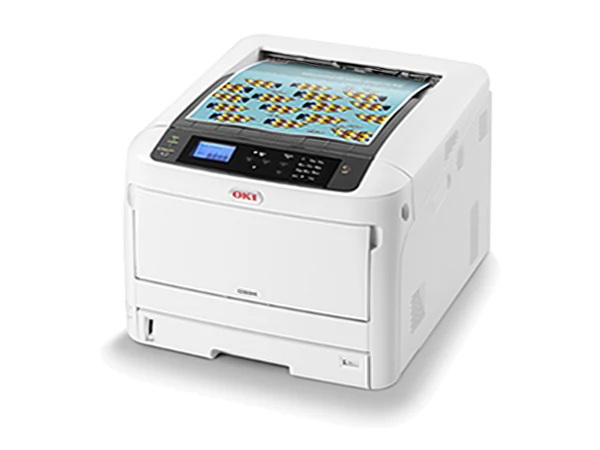
OKI's first C800 generation, and what to do as yours ages.

Specs

OKI C831 specifications, in brief

As published by the maker. Each one is checked over, and you see its page count before you commit.

Sheet sizes
A3 and A4
Pages a minute
A4 at 35, A3 at 20
Thickest stock
256 gsm
Suggested pages a month
Up to 5,000
C831: OKI support until
31 March 2028
ES8431: OKI support until
31 March 2029
Followed by
C834, still current
How to pay
Outright, rental, lease or finance

Keep running it, or replace it?

There is no prize for replacing a printer that still works, so while OKI supports yours and the prints look right, carry on. Being among the earliest A3 OKIs, though, a C831 or ES8431 is likely to need more parts and visits as it ages, and the current C834 is the printer to move to when that happens. We can remove the old one in the same changeover (trade in).

Changing over to a newer OKI

A new C834 is available from us, as are secondhand OKI A3 printers, each checked and sold with its page count in writing. Delivery, network setup and a run through for your team are part of the price. With our service agreement in place, a machine that fails is replaced for the whole term.

Pay for it outright, or take a rental or lease once approved. Selected machines can be rented from $15 a week plus GST, and when a rental ends you can upgrade or hand the machine back.

Four things to ask about a secondhand OKI

  • The page count, in writing. With an OKI, pages printed are a far better guide to condition than the year it was made.
  • Drum and fuser life. These parts wear with every page. Find out how far through their life each one is.
  • Options on board. Ask whether it has a stand, a duplex unit or more paper trays, since each one changes the work it suits.
  • Support, now and later. We look after every machine we supply. Before you buy, we also tell you how long OKI will keep supporting that model.
Rather ring?Run your options past someone who has done this for decades.Monday to Friday, 8am to 5pm
(07) 5631 9266Request a quote
Weigh it up

Other machines to weigh against the OKI C831

Every one has a page of the maker's specifications. Ask about any and we will check what is available.

Secondhand A3 colour printer options in the same class

close to 35 pages a minute
About the OKI C831

Ask about a replacement for your C831

Describe the work the machine has to do, or name the model you want. We will come back with two or three that suit, each priced in writing, and the decision stays with you.

Easier by phone? Ring (07) 5631 9266, Monday to Friday, 8am to 5pm.

Keen on the OKI C831?

Tell us a little about your business. The reply, in writing, says if one is on hand, how many pages it has printed and what it costs. Every Gold Coast enquiry gets an answer the same business day it arrives.

Asking about: OKI C831

Easier to talk? Ring (07) 5631 9266. We do not sell your details. Privacy.

Replacement warranty

A machine that fails is replaced. Through to the final month.

Any machine we look after on a service agreement comes under our replacement warranty, whatever its age and however you paid for it. Rented, leased, financed or bought outright, new or secondhand: if it fails, we replace it. Cover runs for the whole term of the agreement, through to its final month.

The maker's warranty on a new copier normally lasts 12 months and takes in the hardware; consumables are not part of it. Past that first year, your protection comes from the service agreement. Every detail of the replacement warranty is set down in your agreement.

Asked often

OKI C831: questions and answers

How long will OKI support the C831?

OKI Australia publishes support for the C831 to 31 March 2028, and for the ES8431 to 31 March 2029.

What is the difference between the ES8431 and the C831?

Mostly the sales channel. OKI offered the ES8431 to dealers as its Executive Series model, and kept it available twelve months after the C831 finished.

Could my business rent a replacement for an OKI C831?

Yes, subject to approval: over three to five years for a new machine, or over a term set by its age for a secondhand one. Selected machines can be rented from $15 a week plus GST. Let us know which one you have in mind and we will send the figures in writing.

Gold Coast Copiers

Ring the people who will look after it.

Questions about a machine, a quote or the agreement you are on now, answered by someone with decades in the trade. Monday to Friday, 8am to 5pm. Every Gold Coast enquiry gets an answer the same business day it arrives.

(07) 5631 9266 Get a quote